Hikoi ki Tauanui maunga

Kia ora rā!

Last week on Wednesday, Tautoro School went to the foot of Tauanui maunga to learn more about the whakapapa, the hītori o Tautoro.
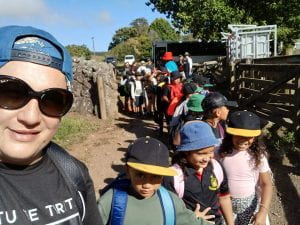
First, we walked from the farm to the foot of Tauanui maunga.  It was an enjoyable walk, a steady incline and a hop, skip and jump over the smallest creek to get there.

Next, we learnt about igneous rocks from Whaea Gloria.  We noticed the scoria was light to lift and porous.  Pumice was even lighter and found in Lake Taupo.

Then we learnt whakapapa from Mrs. Paraha.   Our Room 3 teacher Whaea Hinekoia is new to Tautoro, so enjoyed this class the most.  She learnt that Nukutawhiti had a daughter Moerewarewa, who lived at the pa, Haunganui.  That is how Ngati Moerewa gets their name.

Lastly, we learnt how Tautoro got its name.  Rahiri’s ties (taura) on his korowai got burnt (toro) when he went to sleep next to the fire on top of Tautoro maunga.

The seniors walked up the maunga that day and we look forward to walking up the maunga when we become seniors!

DFI Day 2

Jan 23, 2026

Hiya guys, 

What an enjoyable session with DFI today!

My highlight was making a video recording on my Google Meet with two of my buddies.  

I think this is so good, it’s going to teach me how to add videos to things.  Amie (one of our coaches) talked about how to embed the video.  I was too slow to follow so I’ll be asking my coach Fiona to help me.  If you see a video on my post it means I was successful.

Other things I loved was “TAMING YOUR TABS” which is great, it minimises thinking power when you just have a few tabs open.  I liked how you can pin important tabs so you don’t accidentally close them.  That’s by right hand clicking on the tab and going to Pin.

Things I want to explore is what I think her name is Dorothy Burt mentioned, lesson bytes.  I want to have a good browse in there to see if there is anything useful for me personally as I am teaching Year 3 and haven’t taught the lower levels for a few years. 

E mihi ana ki a koutou!

PS

Ctrl shift T is great – I can check if my children have been off task.  It’s so important to monitor that, we need them learning!

My first blog


My first DFI blog

Introduction 1

Tips 1

So what? 2

Things I wish to learn more about 2

Kia ora rā e tātou mā.


This is my first entry into an edublog blog, and a first blog for me in a very long time.  It feels really good to reflect.  I’d like to share my learning for my first DFI workshop today.


Introduction


Firstly, there was an introduction to Manaiakalani.  This was great for me as I’m teaching for the first time at a Manaiakalani school.  We talked about DIGITAL EQUITY and how this can affect students across all socio-economic spaces.  So how lucky are our students to be involved in a space where there is work done to ensure digital equity?!  


Secondly, I learnt quite a lot about how to use a google document.  I thought I knew how to use a google document however I’ve learnt a few little tips.


Tips


  • Tip: Control Shift V  –To paste without the formatting
  • Tip 2: Use the ‘normal text’ pop down button to make ‘Titles’ and ‘Headings’ which can then be recognised when making a ‘Table of contents.’
  • Tip 3: To make a Table of contents – Insert, Page Elements, Table of contents, and then choose your style
  • Tip 4:  You can add a heading later, refresh your Table of contents and then it will update it with the new heading
  • Tip 5: Press the @ symbol and you get lots of ‘smartchips’ options such as entering in the date, a timer or a draft email which will leave you a draft email in your gmail account that you can edit or send later
  • Tip 6: You can add a bookmark by pressing the image to the left of the url and it creates a bookmark for you
  • Tip 7: You can create shortcuts within folders in your google drive so you’ve got relevant information in the the relevant folders
  • Tip 8:  You can drag and drop images into remove.bg and remove the backgrounds so you can have an image for a display
  • Tip 9:  You can change the colour of the background of your google document, have a table, insert images and blurbs, then make the table border the same colour as the background so it looks like a well set out poster
  • Tip 10:  Tools has voice typing and citations which can help with those who struggle to write/type and those who need to reference at university respectively.
  • Tip 11:  I can explore these further and learn more


So what?


I can use these useful tips to make my work more interesting and efficient.  I can show/teach these handy tips to my students.  They are the future and need to be better than us, and they need to utilise these different tools to their full capacity.  Getting them to delve deeper into using such tools will assist them to further explore and discover new knowledge.

Things I wish to learn more about


Sometimes you don’t know what you don’t know.  But I happen to know that I don’t know anything about extensions.  My next steps is to delve into that before the next DFI session.  So that I can be even more confident as a teacher teaching at a Manaiakalani school.

Hello world!

Welcome to your brand new blog – a space to share your learning journey.

To get started, simply visit your blog’s dashboard, edit or delete this post and check out all the other options available to you.

Like more help?

We can walk you through step-by-step in our guide to getting started with your blog.

You can see what other learners are sharing on their blogs here.

Happy blogging!